Sunday, September 4, 2016

A beautiful effects to text in Office 2010

For making Word 2010 document or other such food, or certificate Brochure's product. I need to insert effects to text in Word 2010, it is interesting to have the tools to do the effects last. Whether wearing shiny reflection fluorescence or other text can be made by this method.

1. Type the text you want to insert effects. The format letters. Then, use the mouse to drag across the text to insert effects.


2. On the Home Ribbon, click the menu button A (blue) shows the scheme's effects to be seen with the mouse cursor to hover over the form. It will preview the first real choice.
3. When choosing any form, click on the button that format. ? The message is put out by the selected effect immediately.


4. You can also customize the effect by clicking on the display itself.

Outline Select text color
Select Interface Shadow Shadow
Reflection choose a form of light.
Glow glow around the selected text.


In order to customize the Quick Access Toolbar Office 2010

Quick Access Toolbar? What is part of the program? MS Office 2010? Quick Access Toolbar appears at the top left of the program window. Shows the commands used to thinking in three buttons Save, Undo, and Repeat In fact, most users will have command sedentary than their own, the MS Office 2010 to which we can add a button. Other applications We often used to have.


1. Click on the button A small triangular The command buttons on the right side of the three buttons mentioned above.
2. A list of buttons displayed to click on the appropriate button. Click on the order button, it will show up on the Quick Access Toolbar now.


3. In the event that we need to show more command buttons in clause 2, then click the More Commands?
Options window is displayed, select the command much more
4. Choose a command in the Choose commands from:.
5. Select the desired command.
6. Click the Add >> button to add it to the list in the toolbar.
7. The selected item is displayed in the command list on the right.
8. Click the OK button to the Quick Access Toolbar is the order we choose to rise immediately.


Saturday, September 3, 2016

The reference cell for office Excel 2010.

Work space excel will have a table in the table, all the cells, and each cell has its own name, such as A1, B5, C3,. Al., The individual cells must have intended it to be. you can tell the location of the cell and the cell itself.

           If you notice, it will find the English alphabet abcd directed at the top of each column and the number 123 is limited to the forefront, which is named the column and row names is intended to tell the location of each cell in the table, you are clicking. the light box we find the name row with it.

From the picture above, this method is called a cell, click the Name column and row names of such C6 refers to cells in a vertical column C, trimmed with rows of six sections F5 to refer to cells in the vertical column F intersects the row. 5, etc.
Create new Workbook
The program has been created to excel Workbook up automatically, but the use excel to create more Workbook it can create at any time by pressing Ctrl + N.
Create Workbook from Template
    Template style building is being used as a model template for the other documents may also be using the style or format of the text, including the formula varies. So when we create a document from a template features of the template will be automatically transferred to the document.
      In excel 2010 provides template for calculating the ground up for use, such as the calculation of costs, sales reports to calculate a monthly budget, making quotation so we can use it as appropriate, as an example. from now on
To find the template that has been designed very well to Bowen maker for users outside the data can then copy the data into the tables to calculate the debt without wasting time creating recipes or design new hair to waste time. Discover the bottom like in it.

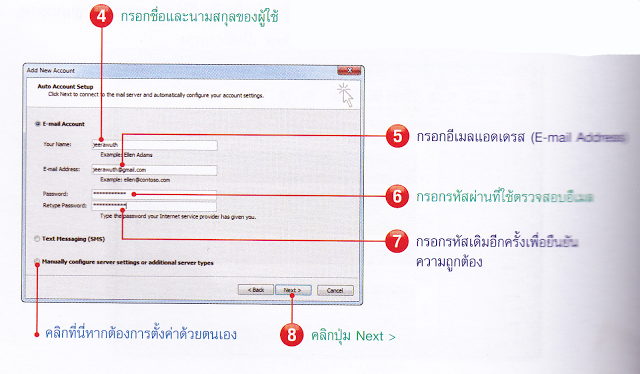
Tune outlook when first activated.

Outlook 2010 has enabled us to experience first-step email setup below.
When I open outlook, click next.

Click yes to determine the list for email.


Input your names of users


outlook 2010 will check the name and e-mail to various settings automatically.


Click the check mark next I accept the team in the license Agreement to accept Thailand and the outlook Hotmail connector.


Note:
After the setup is complete, the first email-enabled outlook the next time there will be no window for configuring email us to use outlook immediately.


Access 2010 Introduction

Microsoft office access 2010 is one of the programs in the suite Microsoft office 2010 is a program for people to pay attention, but users Lang feels that Access works very hard, probably because the texts are released today. did not specify the basis that many people get tired Konami Access, which unfortunately in reality, Access does not work hard if we are to optimize job very much.
Database
Before use, access, we should know that the database (database), which refers to storing data in an organized and systematic, using a computer to help us to add data query, modify the information included. Analysis of the data correctly quick sample database that is noticeable in store merchandising system, which has a number of modern storage as a separate category is assigned a code and product pricing. Discounts and clearly as we would purchase a salesperson will use a bar code reader to know the name of the product and the price charged to accurately and quickly.
With access
a program used to manage access to the database bonding (relational database) consists of several square tables with relationships such as customer data tables with table must be correlated with each other through relationships and so on.
  Highlights of the access is easy compared with the same switch and flexibility in applications for data management in the computer, whether it is search data to calculate the data analysis, report preparation. the programming and to develop an application that works more diverse following.

An interesting feature of microsoft office word 2010.

Microsoft office word 2010, also known simply as the World 2010 is an Office version that is used for a lot of programs that have the ability to work on documents, generate reports, letters, notes and information. create data tables, etc. it can also create an html document, which is part of creating a website with tools to format documents that serve a variety of applications, making it easy with Microsoft. office word has become very popular today and are widely used in offices, educational institutions, whether government or private, or home-based facilities.

Features and capabilities of interesting word 2010.
word 2010 microsoft office 2010 suite is one of the deformation features that enhance the performance and capabilities of your document is formatted with beautiful graphics.
Smarart new format, the authors describe the features and capabilities of an interesting word 2010 by topic.

Customizable interface slight increase in performance.
Interface design new models which, although unchanged from version 2007 slightly to just change the logo, the circular version 2007 is a quad, it makes the program simple, but still easy and quick to run the services. good
Artistric Effects Editing functions quickly.
In previous versions, if you want your photos and images into documents such as transforming a photo into a painting, we have to use image editor like photoshop retouching and then put it in the papers, but the explosion in 2010 can use. artistic Effects editing functions without the need for another program.
Remove Background Remove the background image of your photo.
Function to remove background is another function of managing images added to the new version in 2010, which helps to remove the background image just as easily click and select Delete unwanted it would get a negative background. neat

To create a presentation Powerpoint 2010.

Creating a new presentation can be done three ways as below.


The first presentation from a blank presentation.

         This method is suitable for those who want to make presentations on their own power point without introducing anything. The need to increase their own ability alone. If you choose this method, we have to do many things, such as the text in the selected color decay characteristics ground degraded. And font sizes appropriately so.

The two create a presentation from a template (Tamplate).

         The presentation began with a slide made power point prepared this way, for those who do not have much time because the power point created slides to number one and suggest placement of text, as well as the position of the picture. as an example, users can selectively dissolve a format similar to the content of their own to cut right to edit some content to instantly create presentations, users can use the program as a template power point next to. is set to choose a template that has been created.

The third presentation of the theme (Theme).
         Create a presentation slide design as well, whether the breakdown of the Season in the various components of the metabolic includes characters from the first power point to comfort me, just one sheet, then users. cover Select growing vegetables or other things to slide power point to order the building crumble with power point to choose the right color automatically, we do not need to set the color or various forms but a beautiful layout. the program, which has a power point, then we can also download new themes from office immediately online.

Perspective and create simple presentations with powerpoint.

Continuation of the previous chapter, where the reader to experience a different part of the power point, whether it is open to install software with key components of the program, power point, including commands in reborn, and in this chapter will be discussed. view to view the sentence of a changing perspective as well as how to create and edit presentations as simple basics to keep in mind before starting a job offer in the next chapter.

View and change the view.
Program power point 2010 with a view to love to sleep in five different views as follows below.
1. Normal view (Normal view) suitable for building and fixing things slide.
2. Slide Sorter view (Slide Sorter View) for sorting and decay set in order to change the slide.
3. Page view notes (Note Pages View) to take note of what the speaker wants to offer but do not want the audience to see.
4. Reading view (Reading View) is a view to the presentation by the extended break to the full window.
5. To view the presentation slides (Slide Show View) is a major extension slides used in the presentation by the full-screen image.
          Each view can be helpful in making a presentation to the selection of different views properly helps to create beautiful presentations done efficiently and at peak performance all the more in the paint. If you opt for the opposite view, incorrectly, to make creating presentations is to delay the presentation of sports cars like a hole to run in the woods, the 4-wheel drive vehicles.
How to change the view
How to do a second method is to click on a button and the click of a button reborn switch views.

Method 1 Click the View tab on the Ribbon, and then click the button to switch to the normal view, slide sorter view and a notes page and view the presentation slides, respectively.

Method 2, click the Change View button in the bottom right corner of the program. Readers will see a small button on the fourth button, a button to switch between the default view from a normal view, slide sorter view and reading, respectively, the last group is a slideshow to show. presentation in full screen

Normal view
   Normal view (Normal view) is of the view that readers have to work with most often used for building and decorating various internal breakdown of the frame with four parts: window (Slide Pane) breakdown medical slides (Slide Tap) Medical corn. sweet and windows Note (Note pane).

Slide sorter view
          View slide sorter Slide Sorter View is a view that shows all the slides in your presentation to see at one time, showing a breakdown of a sequence used for check presentation before the actual show. readers can add a new slide plates dispersed in order to determine the breakdown of the key technical features of metabolic changes or schedule changes by decomposition.

Page view notes
        Page view notes notes (Note Page View) is a slide show along with all my heart died breakdown note this is often the message about the reminder of the presentation can be saved. In order to describe the prototypical big break something special.

Reading view
          View Reading (Reading View) is a new form of power point 2010 is of the view that the trial presented a power point household breakdown to full window, which the user can control the size window resizing windows on demand. the view that we can change or decay leap to replace the breakdown requirements.

View slide show
            View a slide show (Slide Show View) is a view that we present to be dazzled headphones that this view is like a machine right break at the breakdown for each plan on the computer screen, we can change the breakdown jump to crumble. Information required during the presentation.

How to save an excel all file version.

Files, documents, excel 2010 an identical excel 2007 is the last key xlsx the file excel 97 2003 with the extension xls a result, we can not import files created from excel 2010 with the extension xlsx to activate it. the program excels older versions, so if you need to read these documents to excel version will be converted to the extension xl before using the following address below. What to watch out for when saving an excel file version is older, we need to ensure that certain features of the new version may not be applied to previous versions, such as version 2013 are not compatible with SmartArt and not supported by the data conditional formatting includes not. to accommodate the modified math duck and so on.

TIP
Apply button Alt + F + A Save as to why the right to hit me with the details, they can press the F12.

Save the workbook to other file formats.
  In addition to saving a workbook excel 2010 excel 97-2003 version, you can also choose the format of the files in other formats as well as power for use with open office extension. ods pdf files or text files, and so on.

For a model we can also choose to save in excel 2010.
1.Workbook of excel 2010 save files as regular plain.
2.Open Document Spreadsheet saved to a file for use on the set of open office.
3.excel 97 - 2003 workbook so that he can be enabled to excel version.
4.Template save the document as a template
5.Binary Workbook saved as files Binary files, which makes loading and saving files faster.
6.Text (Tap Delimited) saved as text files with data on each individual cell is represented by a space. And fully customize the text as bold italics.
7.CVS (Comma delimited) files are saved as comma-separated data in each cell.
8.Save as Another File Type File notes are other ways in which we can choose other types of files that need to be saved as a template, save it as a Web page or save a file excel 5.0 / 95 onwards.